Writing
What actually works with AI coding tools
In response toHow I use Claude Codeboristane.com
I spent nine months working out what actually works with AI coding tools, specifically on messy, real-world codebases rather than clean demos.
The breakthrough was simple enough to feel anticlimactic: stop letting the AI write code until you have reviewed a written plan.
Not a verbal summary. Not a plan it holds in its head for the length of a session. A written artefact, in a file, that you have read and marked up.
The loop has a name now — RPI: Research, Plan, Implement — and the part everyone skips is the one in the middle.
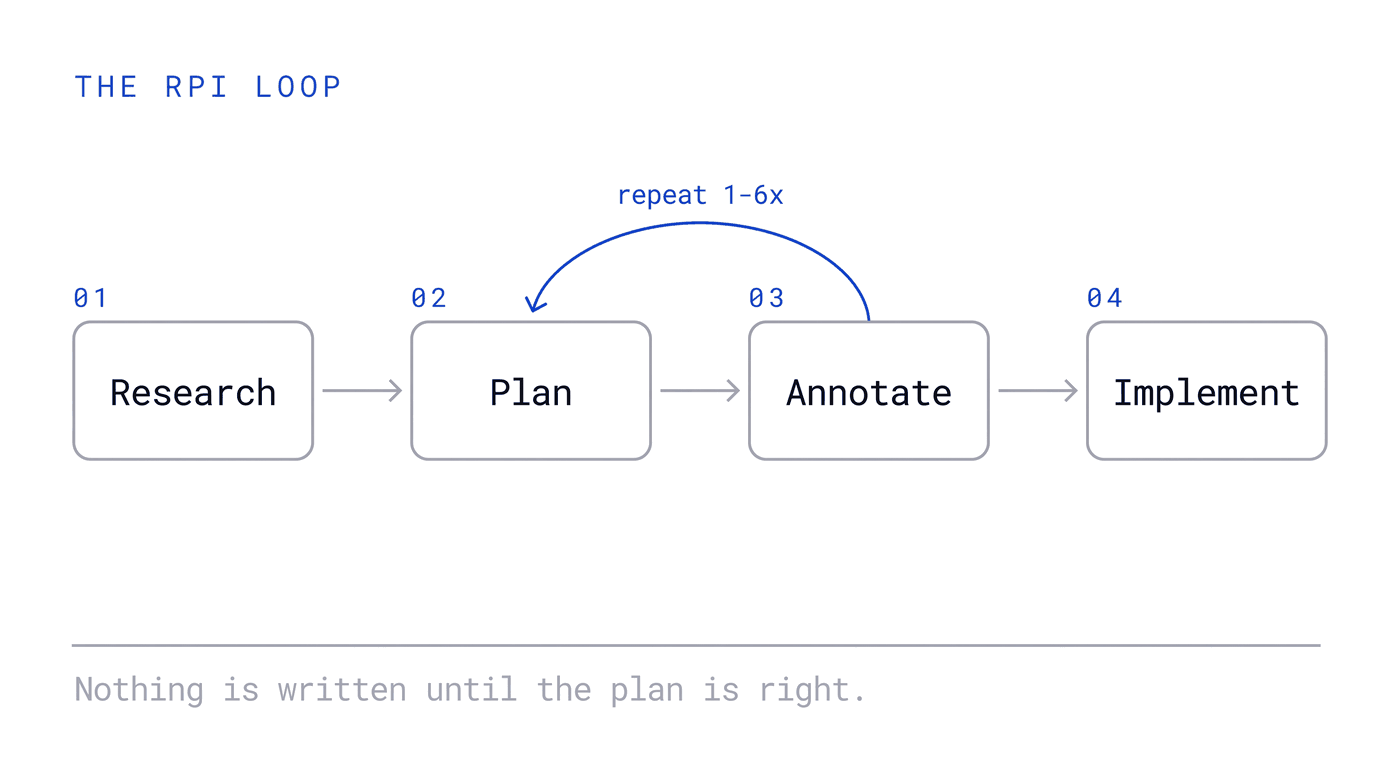
The annotation cycle is where the thinking happens, and it is the step teams drop first.
Why the plan has to be a file
There are two failure modes with coding agents, and they look nothing alike.
The first is the agent making an ignorant change: it did not know that auth/middleware behaves the way it does, so it broke something it never looked at. The second is the agent making a wrong change: it understood the code perfectly and built the wrong thing, because you and it were never aligned on what the thing was.
Research prevents the first. The plan prevents the second. Skip either and you find out during implementation, which is the most expensive place to find out.
1. Research: force it into a file
Do not accept verbal summaries. Force deep reads into persistent files.
"Read
auth/middlewaredeeply. Write findings inresearch.mdwith intricacies."
Written artefacts surface review. A verbal summary sounds equally confident whether the agent read three files or thirty, and you have no way to tell which. A written one lets you see what it actually looked at, and catch misunderstandings before they become broken implementations.
2. Plan: detailed, and in a file you control
Request a detailed plan in plan.md — code snippets, file paths, trade-offs.
Not the built-in plan mode. This matters more than it sounds. Use custom markdown files that you own, that sit in the repository, that you can open in your editor, diff, and keep. A plan you cannot annotate is a plan you cannot argue with.
3. Annotate: this is where the thinking happens
Review the plan in your editor and add inline notes directly into it:
- "This breaks the OAuth flow"
- "Use the existing
UserServiceinstead" - "Security: validate input here"
Send the annotated plan back. Repeat one to six times until it is right.
This is the actual work. Everything before it is preparation and everything after it is typing. If you find yourself doing a single annotation pass and moving on, you are almost certainly still designing during implementation — you have just moved where the surprise happens, not removed it.
4. Then, and only then, implement
By this point the implementation is close to mechanical, because every decision that mattered was made in a document you read.
This prevents the most expensive failure there is: code that works in isolation but breaks everything around it. That failure is invisible in a diff. It is obvious in a plan.
One thing that changes the odds
For standard features, provide reference implementations from open source.
An agent working from a concrete example and an agent designing from scratch are not the same tool. The first is doing translation. The second is doing invention, which is where it is least reliable and most confident. If the pattern exists somewhere public and good, point at it.
It feels slower, and it isn't
The honest objection to all of this is that it feels slower. You are writing research notes and marking up a document instead of watching code appear.
But catching an architectural mistake in a fifty-line plan.md beats debugging a five-hundred-line implementation that went wrong from line one. The second one also costs you the review, the revert, and whatever shipped in between.
The speed you lose is visible. The speed you gain is the debugging session that never happened, which is why this workflow is easy to abandon and hard to argue against once you have measured it.
The underlying point
Most teams adopting AI coding tools are optimising the wrong stage. They are trying to write better prompts for the implementation step, when the leverage is entirely in the two steps before it.
Ask where the thinking happens in your workflow. If the answer is "while the code is being written", you are going to keep being surprised.
This is the problem I work on with engineering teams: not whether to use agents, but what has to be true around them before the output is worth trusting. Tell me where your team sits.
Written by Mashhood Rastgar, who helps engineering organisations become agent-native. If this is your situation, tell me where your team sits.